What is a Crypto Sub-Account and How to Use It?
Are you trade on major exchanges like Binance, Bybit, Mexc, OKX, or KuCoin, you have probably seen the “Sub-Accounts” option in the account settings. Most retail traders ignore this feature, but it is so useful that it can take your trading to the next level and also help protect your funds.
According to a report, big whales use the crypto sub-account feature very often because it is such an amazing feature. Once you learn about it, you will not want to trade without using it.
In this detailed guide, you will learn what a crypto sub-account is, how to use a crypto sub-account, how to create one, and many other important things. So, read this guide completely.
What Is a Crypto Sub-Account?
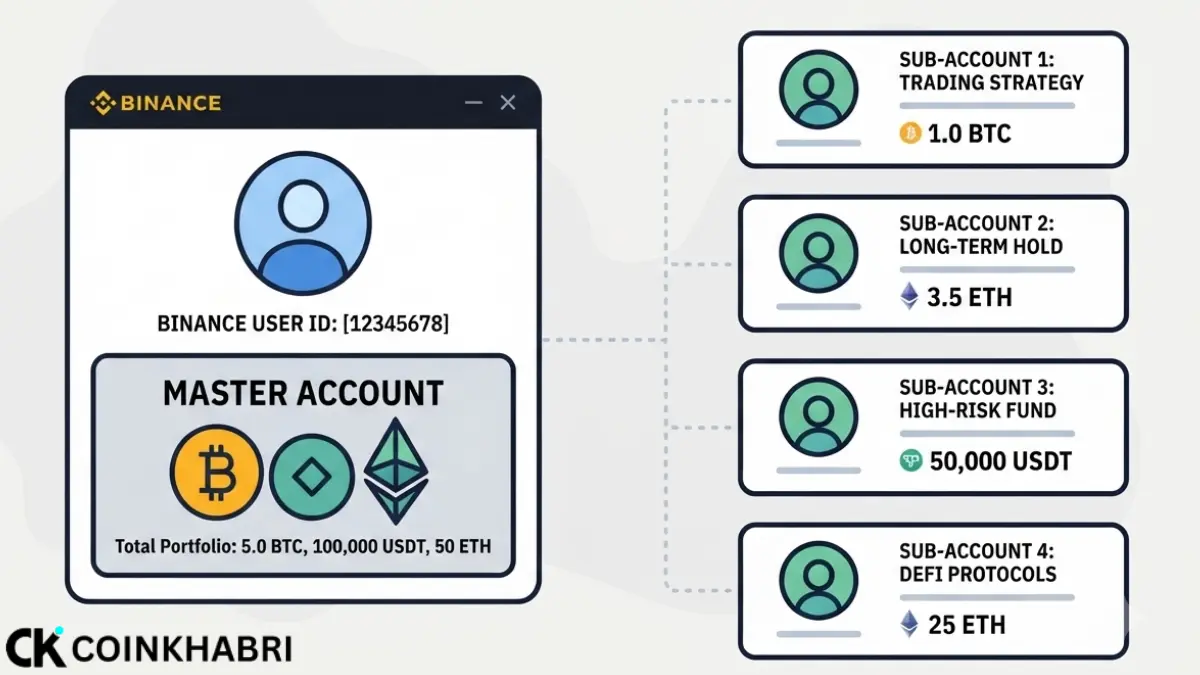
A sub-account is like a separate account that is created under your main account on an exchange like Binance. It works almost the same as your main account, but you can give it only the permissions you want.
Suppose you have $1,000 in your main account, and you trade with a third party that asks you to connect an API key. If you connect the API key from your main account, then your full $1,000 is at risk. But if you create a new crypto sub-account, it will work like a complete account, but it will have a different API key. Then you can transfer only $100 from your main account to the sub-account. This way, instead of risking the full $1,000, only the $100 in the crypto sub-account is at risk because you gave the third party the API key of the crypto sub-account.
There are many other examples, but this is the easiest and best example to help you understand what a crypto sub-account is. You also do not need to complete KYC for a crypto sub-account. The KYC that you already completed on your main account is automatically used for the crypto sub-account.
Crypto Sub-Account Key Features
A sub-account has many features that are very helpful for you. Below, we have discussed its main features.
Protection from Hacks
Nowadays, there are many scams and hacks in the crypto market, which can cause your funds to be stolen. For example, if you have $1,000 in your main account and your main account gets hacked, you may lose all $1,000.
But if you have created a sub-account and already transferred $100 into it, your $100 will remain safe.
Even if your main account gets hacked, nothing will happen to your crypto sub-account. Whatever funds are in the sub-account will remain safe.
If you want to understand how hackers execute SIM swap attacks and how to protect yourself, this guide, What Is a SIM Swap Scam and How to Protect Yourself: 2026 Guide, covers everything you need to know.
Main Account Limitations
If you use only your main account and the exchange places a limitation on it, such as not allowing you to trade for 24 hours or applying any other restriction,
you can still trade using your crypto sub-account because that limitation will not apply to your sub-account.
Profit Sharing
For example, you take $100 from someone to trade. You both agree to share the profit equally at the end of the month. For this, you create a sub-account and transfer that person’s $100 into it.
Now you trade using that $100. At the end of the month, you will only see the report for the $100 that was transferred, including how much profit or loss it made. The rest of your funds will remain in your main account.
If you are looking to earn on Binance without active trading, read our latest guide: Simple Earn vs. Binance Launchpool: Which is Better in 2026?
How to Create and Use a Crypto Sub-Account (Step-by-Step)
Creating and using a sub-account is very easy. Just like you use your main account, you can also use a crypto sub-account in the same way. How to create a crypto sub-account is explained below step by step.
Step 1: Log in to Your Main Account
Log in to your main account, no matter which exchange you use. Use your security method to log in, such as 2FA or a simple passkey.
Step 2: Go to Settings
If your exchange offers this feature, go to the settings. Look for Crypto Sub-Account or Account Management, then click on it.
Step 3: Create a Crypto Sub-Account
You will see an option to enter a name. Choose a unique name. Pick the name carefully because you may not be able to change it later.
Step 4: Set Permissions
After that, set the permissions for the crypto sub-account. For example, choose whether this account can withdraw funds or not. Select only the permissions you want to allow, and leave the ones you do not want.
Step 5: Transfer Funds
Now transfer funds from your main account to the crypto sub-account. After that, use the sub-account for the purpose you created it for.
Conclusion
A crypto sub-account is not only for institutions. It is a practical risk management and organization tool that any trader can use if they manage more than one strategy, bot, or team member. When used correctly, it gives you the same separation as different accounts but with one login and one KYC.
Every exchange has its own small rules, limits, and naming system. Binance, Bybit, OKX, and KuCoin all work a little differently. So before you start live trading or automation, make sure to read your exchange’s official crypto sub-account documentation.